News & Events

Turn Complex Data into Instant Situational Awareness with Wavestore VMS v6.46

Unlock the full potential of Wavestore v6.46 -view our launch presentation today and explore the latest innovations in video management.

VIEW PRESENTATION

Bridge the gap between detection and decision with Wavestore v6.46—designed to turn complex data into immediate, actionable visual intelligence.

In critical security environments, the speed of your response is defined by how quickly you can interpret the scene. Wavestore v6.46 introduces significant enhancements to our Maps and Analytics engines, ensuring operators have the immediate visual context they need to make split-second decisions.

Visualizing Threats: The Evolution of Maps

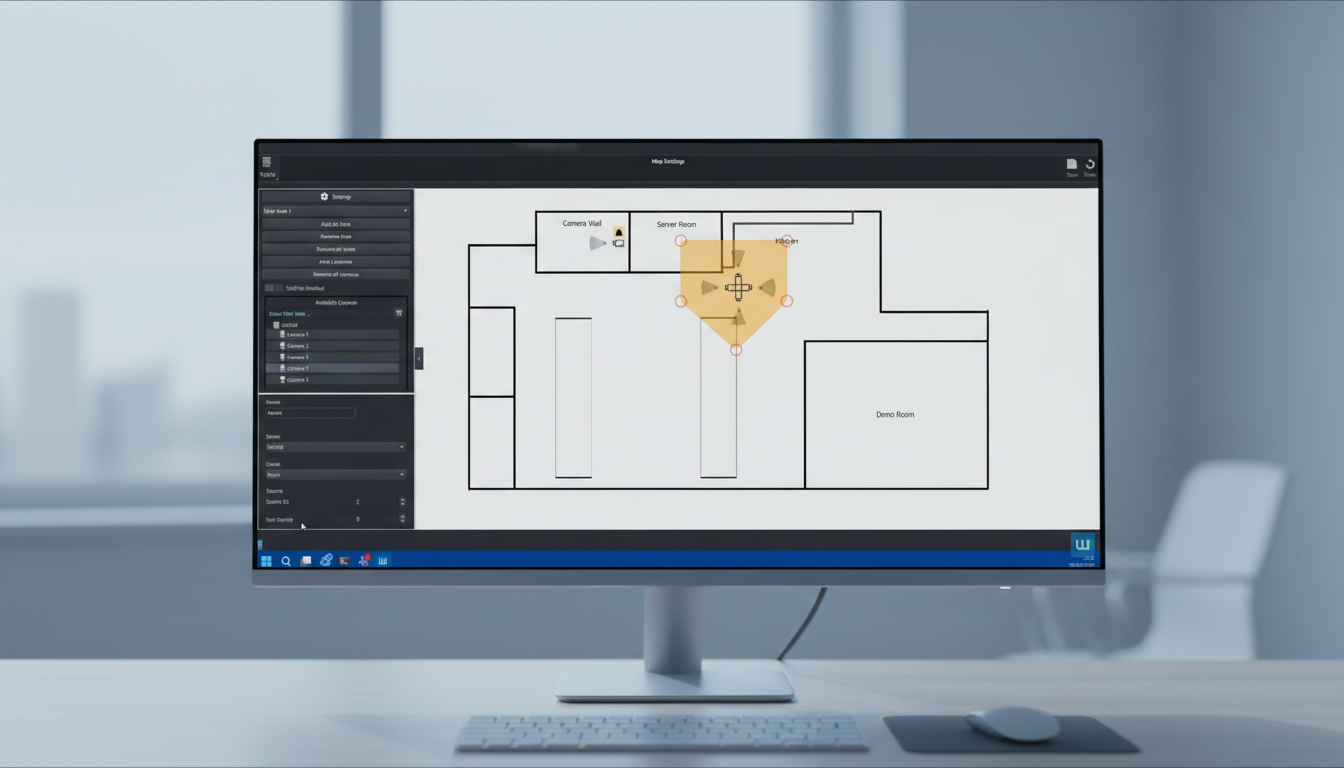
Situational awareness is about more than just seeing a camera feed; it is about instantly understanding the location and context of a threat. WaveView v6.46 expands our revamped Maps system with powerful new navigation and verification tools:

  • Interactive Alarm Zones: Operators can now assign specific inputs (e.g., fire alarms, intrusion sensors) to configurable "Alarm Zones." When triggered, these zones visually blink on the map to draw immediate attention. Crucially, clicking an active alarm zone can instantly present video from before the event occurred (configurable pre-event buffer), allowing operators to see the cause of the alarm, not just the aftermath.
  • Seamless Site Navigation (Area Linking): We have introduced "Area Linking," allowing you to create hotspots that link different map layers. Operators can now drill down from a high-level site map directly into specific building floor plans simply by clicking an entrance or designated zone—simulating the experience of "entering the building."
  • Real-Time Status Feedback: Map elements now feature live status updates. If a camera goes offline or a zone triggers, the visual feedback is instantaneous, and the status clears the moment the device recovers.
  • Customization & Setup: Tailor your environment with the ability to upload custom camera icons. Configuration is also faster; the setup screen now visually highlights cameras that have already been mapped, preventing duplication during commissioning.

Granular Intelligence: Enhanced Analytics

As metadata becomes the lifeblood of modern forensic search, v6.46 deepens our integration with analytics edge devices:

  • Complex Object Classification: We have added support for analytics results containing multiple colours per object segment and multiple classes per object. This allows for highly specific forensic searches (e.g., searching for a "Person" classified as "Staff" wearing "Red").
  • Vehicle & Facial Metadata Support: The analytics engine now natively supports "Bus" as a vehicle type and has improved handling for facial recognition metadata streams from supported edge devices, ensuring seamless event logging and searchability.
  • Dahua Integration: We have improved the handling of analytics data streams from Dahua cameras, ensuring robust metadata synchronization.

Operational Excellence: Reducing Friction

Wavestore v6.46 addresses the daily operational realities of system administrators and operators:
  • Smarter Maintenance: Cameras placed in Maintenance Mode will no longer trigger "Video Loss" events or other faults. This prevents false positives from flooding the control room during routine service, reducing operator fatigue.
  • Password Integrity: A new password synchronization mechanism prevents false positives when checking for desynchronized passwords across server groups, ensuring your system status remains accurate.
  • User Accountability: The "Shutdown by user" log message now explicitly states which user initiated the action, improving audit trails and accountability.

Quick Benefits Summary

  • Downgrade Safety: Changes to the downgrade mechanism prevent the downgrading of kernel and boot files, ensuring system stability during rollbacks.
  • Hardware Compatibility: Improved handling of unsupported hardware regarding disk ordering and better "Clear-TMP" command logic.
  • ONVIF Control: New option to allow disabling camera reboots via ONVIF commands.
  • Reliability: Fixed issues where Standby Failover servers might not take over as expected, and resolved frame rate stability issues on audio-enabled cameras.
Situational awareness is key for operators who have to act fast to incidents.

What this update means for you

For System Integrators: Streamlined Commissioning & Safer Maintenance
We know that setting up complex site maps can be time-consuming. The updated Maps setup screen now visually highlights cameras that have already been placed, preventing duplication and speeding up configuration. Furthermore, the refined Maintenance Mode ensures that while you are working on devices, you aren't flooding the control room with false "Video Loss" events—allowing you to work quietly without disrupting live operations. Additionally, the improved downgrade protection for kernel files ensures that system rollbacks, if necessary, are safer and more stable.

For Security Officers: Instant Context & Intuitive Navigation
Response time is critical. With Interactive Alarm Zones, you are no longer looking for a needle in a haystack; the map visually guides you to the threat with blinking indicators. Crucially, clicking an alarm doesn't just show you what is happening now—it instantly retrieves video from the seconds before the event triggered, giving you immediate context on the cause. The new Area Linking feature also makes navigating large sites intuitive; simply click on a building entrance or zone on the map to "walk" into the floor plan, just as you would in the real world.

For System Administrators: Greater Accountability & Stability
Managing user behavior and system health is now more transparent. The updated audit logs now explicitly identify which user initiated a server shutdown, closing a gap in accountability. Behind the scenes, we have hardened the logic for Failover servers and password synchronization across server groups, reducing false positive administrative alerts and ensuring high availability when it matters most.

Upgrade to Wavestore v6.46 Today

Wavestore v6.46 is more than a feature update; it is a workflow upgrade. By transforming static maps into dynamic response tools and deepening our analytics capabilities, we are ensuring your security operation is proactive, not just reactive.

Whether you are managing a complex multi-site campus or a high-security facility, v6.46 provides the clarity and control required to turn video data into actionable intelligence.

Ready to upgrade?
For more information on compatibility or to download the latest update, please visiit wavestore.com/downloads or contact your authorized Wavestore partner.

Book a personalized demo with one of our specialists here: wavestore.com/demo

A group of five diverse business professionals smiling and engaging in a lively meeting around a table with laptops.

View Wavestore v6.40 presentation

Solutions for a world we can't yet see. Discover v6.40 features helping people and businesses.

View Wavestore v6.46 presentation

Solutions for a world we can't yet see. Discover v6.46 features helping people and businesses.